In the interest of spending less time typing, since most of my day is spent in front of a computer (both at work and at home), I recently purchased some software that will type for me.
It's called Dragon NaturallySpeaking 9 Preferred. I don't know if I really needed the Preferred version, but it was what was selling on eBay. I have only just begun to use it, but I can already tell it's going to be a challenge. I think it's just that there is a learning curve and that you need to have the patience to "train" the software to recognize your voice, as well as to learn the commands to make the software function as best it can.
The most annoying thing about the software is that you can only put it on one computer. I find that really irritating because I am the only one using it and I would like to be able to use it both at work and at home. gar.
Anyway, as time goes on and I slowly become accustomed to this program, and it becomes accustomed to me, I will continue to post as to whether or not this is a good product. I have to say that I was very frustrated with it earlier today but then decided to "train" it some more, and it is already doing a much better job of recognizing my speech. So far I'm pretty impressed.
Tuesday, October 31, 2006


Thursday, October 26, 2006
Browser Wars
I was checking out my stats earlier and it is finally the case that more of my visitors use Firefox (57) than MSIE (39). The other 4 used Safari, Netscape, or Mozilla.
The free version of StatCounter only tracks the most recent 100 visits. Then again, it's probably taken me weeks to amass the above 100 visits....
The free version of StatCounter only tracks the most recent 100 visits. Then again, it's probably taken me weeks to amass the above 100 visits....
Podcasting: What, How, and Why
...is a presentation Andrew and I gave waaaaayyyy back in August at the OLC Children's and Young Adult Services Conference (see Andrew's post here). Andrew is good with the technical aspect of podcast creation, and I'm a podcast listener/subscriber (or was, haven't had much time lately). Plus, I worked in a public library for years (during high school and college), which was helpful given our audience. Basically, combined we are an awesome team. :)
Our presentation had excellent attendance (owing partially to the fact that the seating was very limited, so all presentations were well-attended). The audience was great, and overall it went really well.
Podcasting really is pretty easy. We ran through the entire process, complete with various options, in our allotted time period. In addition we covered possible uses, why you should podcast, how to listen/subscribe, publicizing your podcast, various challenges to podcasting, and finally briefly touched on the ways you can go beyond podcasting (vodcasting and screencasting).
The wiki for our presentation is here (the powerpoint is available there as well). A list of ways to use podcasting in children's and young adult services is here.
Our presentation had excellent attendance (owing partially to the fact that the seating was very limited, so all presentations were well-attended). The audience was great, and overall it went really well.
Podcasting really is pretty easy. We ran through the entire process, complete with various options, in our allotted time period. In addition we covered possible uses, why you should podcast, how to listen/subscribe, publicizing your podcast, various challenges to podcasting, and finally briefly touched on the ways you can go beyond podcasting (vodcasting and screencasting).
The wiki for our presentation is here (the powerpoint is available there as well). A list of ways to use podcasting in children's and young adult services is here.
Monday, October 23, 2006
Sexy Librarian Search Interface
The Laughing Librarian has a post about Ms. Dewey, a new search engine that is highly entertaining. Who knows if she's useful but it sure is fun to think of clever questions to ask her because her response varies based on what you ask.
She's getting criticized in various articles, such as this one and this one, but I don't care. Even the fact that she's a Microsoft creation isn't enough to make me dislike her! She's funny and sarcastic. However, I do agree that she needs a longer loop of her impatient activities. Her cackling about ruling the world is pretty funny but I could probably only take that about 15 times before I got a bit irritated.
Seriously though, she's a sexy librarian with attitude. How could you go wrong with that?
I suggest you check her out. ;o)
She's getting criticized in various articles, such as this one and this one, but I don't care. Even the fact that she's a Microsoft creation isn't enough to make me dislike her! She's funny and sarcastic. However, I do agree that she needs a longer loop of her impatient activities. Her cackling about ruling the world is pretty funny but I could probably only take that about 15 times before I got a bit irritated.
Seriously though, she's a sexy librarian with attitude. How could you go wrong with that?
I suggest you check her out. ;o)
Friday, October 20, 2006
Gadget Love
I've found another online whositswhatsits that I'm just in love with. It's called coComment and has been around way too long for me only to be using it just now. It lets you track the comments you leave, so you can see when someone adds a comment after the one you left (perhaps the blog author responding to your comment - I always forget to check back and see if they've done that!).
How handy!!! I love it!
And you don't really have to do anything because it just recognizes that you are leaving a comment and keeps track of it for you. As long as you use Firefox anyway.
Woo hoo!
How handy!!! I love it!
And you don't really have to do anything because it just recognizes that you are leaving a comment and keeps track of it for you. As long as you use Firefox anyway.
Woo hoo!
Yoo hoo, Academic Librarians!
Not that many academic librarians read my blog, but whatever.
I was catching up on my blog reading today (how on earth do I always manage to get so far behind? Oh wait, I know, 3 weekends in a row of weddings, two of which I was in. Yeah, that will do it), and I came across a post on ACRLog asking where the academic librarian bloggers are and why they hadn't yet added their blogs to The Academic Blog Portal.
So I promptly added my blog to it. If you are a blogging academic librarian, please add yours too. :)
I suppose I should make a wiki page for my blog, too, but, well, I'd forget to update it.
And I know this is not really relevant, but it's Friday and I'm in a goofy mood, so I'm going with it: how does one say "ACRLog" anyway? ACRL-og? A-Crlog? ACR-Log? ACRL-log?
I was catching up on my blog reading today (how on earth do I always manage to get so far behind? Oh wait, I know, 3 weekends in a row of weddings, two of which I was in. Yeah, that will do it), and I came across a post on ACRLog asking where the academic librarian bloggers are and why they hadn't yet added their blogs to The Academic Blog Portal.
So I promptly added my blog to it. If you are a blogging academic librarian, please add yours too. :)
I suppose I should make a wiki page for my blog, too, but, well, I'd forget to update it.
And I know this is not really relevant, but it's Friday and I'm in a goofy mood, so I'm going with it: how does one say "ACRLog" anyway? ACRL-og? A-Crlog? ACR-Log? ACRL-log?
Tuesday, October 10, 2006
IM @ Your Library!
Back in early August (yeah yeah, I’m behind, I know), I co-presented with Andrew at the OPAL (Ohio Private Academic Libraries, not to be confused with the other OPAL) Conference (see Andrew’s write-up here – he includes the powerpoint and handouts).
The SpeedUPdating setup for the presentation is a really neat idea - good for us Millennials with short attention spans. There were five different sessions, each lasting about 12 minutes. Everyone was divided into 5 groups and rotated around to each session.
Our presentation was called, “IM…Your Students Use It, So Why Don’t You?” I talked about why a library should offer IM Reference, the advantages over Chat Reference, the lingo and other etiquette information, and challenges. Andrew discussed the different IM providers, usage statistics, how to set it up and market it, and the different types of questions we have received at Muskingum.
In true Andrew and Kate form, and in tribute to the “speed” in SpeedUPdating, we talked as though we were on speed in order to cover everything in our allotted time period. Needless to say, after 5 sessions in a row with very little break in between, I was pretty exhausted.
Overall, though, it was a fun experience, and I would definitely do it again. The disadvantage to presenting, however, is that I didn’t get to see the other 4 presentations.
And, of course, I highly recommend using IM at your library!
The SpeedUPdating setup for the presentation is a really neat idea - good for us Millennials with short attention spans. There were five different sessions, each lasting about 12 minutes. Everyone was divided into 5 groups and rotated around to each session.
Our presentation was called, “IM…Your Students Use It, So Why Don’t You?” I talked about why a library should offer IM Reference, the advantages over Chat Reference, the lingo and other etiquette information, and challenges. Andrew discussed the different IM providers, usage statistics, how to set it up and market it, and the different types of questions we have received at Muskingum.
In true Andrew and Kate form, and in tribute to the “speed” in SpeedUPdating, we talked as though we were on speed in order to cover everything in our allotted time period. Needless to say, after 5 sessions in a row with very little break in between, I was pretty exhausted.
Overall, though, it was a fun experience, and I would definitely do it again. The disadvantage to presenting, however, is that I didn’t get to see the other 4 presentations.
And, of course, I highly recommend using IM at your library!
Monday, October 09, 2006
Our Stats are on the Rise!
I've been meaning to write this post for a while but have been putting it off. However, an article in the Chronicle that details reasons why professors may not include a library research session in their class has spurred me on.
At my place of work, we have seen an increase in many types of usage this Fall. Examples include:
[As an aside, I don't really agree with the paragraph in the article that poses "simple questions" that students don't know the answers to. I don't really think they need to know the answers to those, except for popular vs scholarly. They need to know that they can't look up journal article titles in the catalog, but they don't really need to know why, unless that's going to help them remember that they can't do it.]
At my place of work, we have seen an increase in many types of usage this Fall. Examples include:
- In about 5 week's time, we have done more one-shot instruction sessions than we did all of last year.
- Our database usage stats are way up, probably a result of more instruction sessions.
- ILL borrowing is up. This September saw more than twice as many ILL requests as last September.
- Presentation to the faculty. Andrew and I were given the opportunity to present an update session at Fall Faculty Conference. The session was given twice and we had a large percentage of the faculty in attendance. A lot of changes took place over the summer, and the faculty were impressed with both the changes and our succinct presentation of them.
- Faculty guides to library resources. Last Fall each faculty member received an individualized print guide to the library resources useful in their discipline. Many of these were presented in person.
- Freebies. Every year, we have pens made with our URL on them that we give out during the First Year Seminar library visits. This year, we added our IM name. These pens were also given to all the faculty, along with pads of sticky notes with OhioLINK's info on them.
- Revamping instruction sessions. We now use problem-based learning in our instruction sessions. We create a problem tailored to the class or assignment, have the students research it while we walk around to observe and help, and then go over everything.
- Odyssey. ILL use is probably up because we are promoting it more and we now use Odyssey to receive many of the requested articles much more quickly.
[As an aside, I don't really agree with the paragraph in the article that poses "simple questions" that students don't know the answers to. I don't really think they need to know the answers to those, except for popular vs scholarly. They need to know that they can't look up journal article titles in the catalog, but they don't really need to know why, unless that's going to help them remember that they can't do it.]
Monday, October 02, 2006
Banning Fahrenheit 451
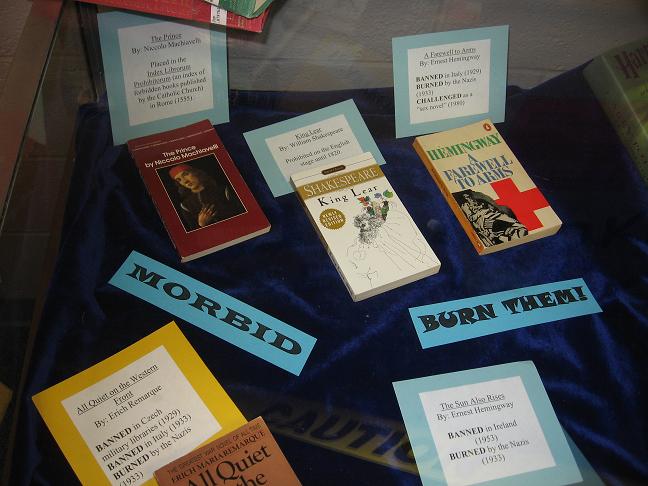
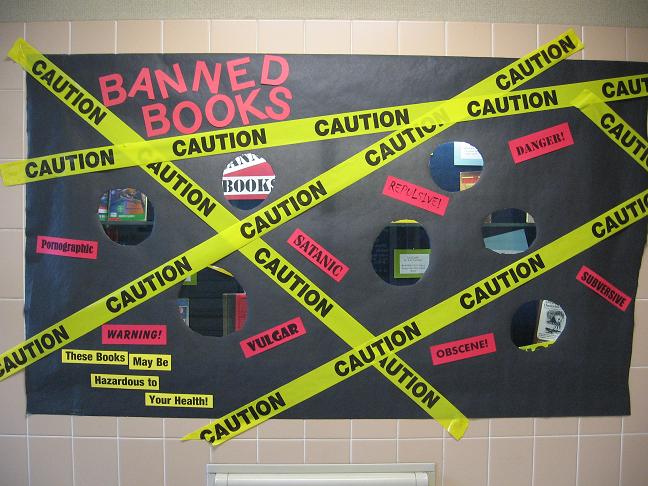
I took down my banned book display this morning (*sob*). Then, this afternoon a friend [thanks Paul!] sends me this link.
Yes, let us please ban a book that is about censorship. Ah, the irony.
It's not the first time. Damn those dirty words of yours, Mr. Bradbury. To hell with them! :D
Yes, let us please ban a book that is about censorship. Ah, the irony.
It's not the first time. Damn those dirty words of yours, Mr. Bradbury. To hell with them! :D
Thursday, September 28, 2006
NSA Documents Released
A friend pointed me to The Memory Hole: NSA Bibliographies, which tells you how to request articles from "Previously unreleased bibliographies and indexes of National Security Agency publications." For free, too. Well, up to a certain point - if it is more than 100 pages or takes longer than 2 hours then it will cost you.
The main Memory Hole website has quite a bit of other "rescued knowledge," including quite a few FBI Reports, military information, and much more.
The main Memory Hole website has quite a bit of other "rescued knowledge," including quite a few FBI Reports, military information, and much more.
Wednesday, September 27, 2006
Open WorldCat shares profits with libraries?
I listened to Talis' Library 2.0 Gang on the OPAC (Online Public Access Catalog, or the online version of the old card catalog) this morning. They raised some interesting points. I recommend a listen for you librarians out there.
They eventually got around to talking about Open WorldCat. Open WorldCat is cool because it tells you which libraries have the item, but I think libraries need to make a more concerted effort to ensure that their holdings are in it. It also has a link to purchase the item for those who would rather buy or don't have a library near them that has the item. I'm pretty sure that used to link out to Amazon, which is a nice tie-in to a well-known site, but instead now it gives you the option to buy the book from OCLC.
Okay, so after further investigation, I see that sometimes it links to Amazon - apparently when OCLC does not have a copy of the item for sale.
Here's an interesting feature I did not notice before: When I click on the OCLC option to buy, it tells me: "Your purchase supports Muskingum College Library." I'm not sure I like that because it's definitely misleading. It certainly doesn't support my library directly (at least not that I know of, but hey, if OCLC wants to start sending us a percentage of the money they make off our users, that's fine by me!). Apparently you can even "Choose a library to support" if it doesn't automatically recognize you as a user of a certain library! Anyone know anything more about this? I'd do some Internet hunting, but I'm feeling decidedly unlibrarian at the moment. :)
They eventually got around to talking about Open WorldCat. Open WorldCat is cool because it tells you which libraries have the item, but I think libraries need to make a more concerted effort to ensure that their holdings are in it. It also has a link to purchase the item for those who would rather buy or don't have a library near them that has the item. I'm pretty sure that used to link out to Amazon, which is a nice tie-in to a well-known site, but instead now it gives you the option to buy the book from OCLC.
Okay, so after further investigation, I see that sometimes it links to Amazon - apparently when OCLC does not have a copy of the item for sale.
Here's an interesting feature I did not notice before: When I click on the OCLC option to buy, it tells me: "Your purchase supports Muskingum College Library." I'm not sure I like that because it's definitely misleading. It certainly doesn't support my library directly (at least not that I know of, but hey, if OCLC wants to start sending us a percentage of the money they make off our users, that's fine by me!). Apparently you can even "Choose a library to support" if it doesn't automatically recognize you as a user of a certain library! Anyone know anything more about this? I'd do some Internet hunting, but I'm feeling decidedly unlibrarian at the moment. :)
Tuesday, September 26, 2006
Search within Podcasts?!
I am far behind on my reading of TechCrunch (124 unread posts to be exact), so thanks to Andrew for sending me this particular post: Pluggd to make podcasts chunkier, searchable.
Pluggd is working to make it so you can search within podcasts to find the parts relevant to you. It looks for both the terms you enter and related terms (I'd be curious to know how it determines related terms...). It then shows you the timeline bar (or whatever you call that thing) with various colors to highlight the degree of relevance. If you hover over them, you'll see the relevant terms.
Pretty sweet! According to TechCrunch, "Pluggd aims to have hundreds of thousands of podcasts analyzed and searchable by the end of the year."
If you are at all interested in podcasts, you should check it out. :)
Pluggd is working to make it so you can search within podcasts to find the parts relevant to you. It looks for both the terms you enter and related terms (I'd be curious to know how it determines related terms...). It then shows you the timeline bar (or whatever you call that thing) with various colors to highlight the degree of relevance. If you hover over them, you'll see the relevant terms.
Pretty sweet! According to TechCrunch, "Pluggd aims to have hundreds of thousands of podcasts analyzed and searchable by the end of the year."
If you are at all interested in podcasts, you should check it out. :)
Monday, September 25, 2006
Lifelong Learning
I don't normally read this type of thing, because, well, frankly they can get rather boring and are always lengthy but this one is actually pretty decent. It's a government report called A Test of Leadership: Charting the Future of U.S. Higher Education. Good luck with downloading, it's a 7MB PDF that I couldn't open because our bandwidth is currently being hijacked by students downloading movies and music. A friend emailed me it instead so I could save it to the desktop that way.
But I digress.
I've made it through about 10 pages and it's not too awful to read. One of the things I liked seeing was that the "Learning" section (page 13 of the PDF) mentioned "lifelong learning" several times. We librarians are all about that "lifelong learning" thing and it's good to see that others are realizing its importance too.
And that FAFSA, yeah, they need to make that thing easier to fill out.
Here's hoping that some of the ideas expressed in this report are accomplished!
But I digress.
I've made it through about 10 pages and it's not too awful to read. One of the things I liked seeing was that the "Learning" section (page 13 of the PDF) mentioned "lifelong learning" several times. We librarians are all about that "lifelong learning" thing and it's good to see that others are realizing its importance too.
And that FAFSA, yeah, they need to make that thing easier to fill out.
Here's hoping that some of the ideas expressed in this report are accomplished!
Tuesday, September 19, 2006
Dirty Anne Read
In honor of Talk Like a Pirate Day, I took the Pirate Quiz. I thought the result was appropriate: Dirty Anne Read. How very librarian:
My pirate name is:
Dirty Anne Read

You're the pirate everyone else wants to throw in the ocean -- not to get rid of you, you understand; just to get rid of the smell. Even through many pirates have a reputation for not being the brightest souls on earth, you defy the sterotypes. You've got taste and education. Arr!
Get your own pirate name from piratequiz.com.
part of the fidius.org network
My pirate name is:
Dirty Anne Read
You're the pirate everyone else wants to throw in the ocean -- not to get rid of you, you understand; just to get rid of the smell. Even through many pirates have a reputation for not being the brightest souls on earth, you defy the sterotypes. You've got taste and education. Arr!
Get your own pirate name from piratequiz.com.
part of the fidius.org network
Destroy a book, get a refund
Well, for the book A Million Little Pieces anyway. I just read the article by About.com's Mark Flannagan about the refund for this book. Interesting stuff. If you bought the book and feel horribly upset and perhaps have developed a psychological disorder as a result of discovering that the book is more a work of fiction than fact, just get a refund by tearing out page 163 (hardback) or tearing off the front cover (paperback) and sending it in.
...As long as you bought the book on or before January 26th anyway, which is when the news got out about it perhaps not being a truthful memoir.
...As long as you bought the book on or before January 26th anyway, which is when the news got out about it perhaps not being a truthful memoir.
Monday, September 18, 2006

Friday, September 15, 2006
Hosting Blogs
Blogging Goes to College: Part 6
You'll be happy to know that this is the final installment of the Blogging Goes to College Brainstorming Session. This last topic was a debate on where to host library/college blogs: in-house or out-of-house. Here are the pros for each side.
You'll be happy to know that this is the final installment of the Blogging Goes to College Brainstorming Session. This last topic was a debate on where to host library/college blogs: in-house or out-of-house. Here are the pros for each side.
In-house:
- Can include branding – university URL, logo, etc
- Privacy issues
- Follow federal and state mandates – FERPA
- Blogger’s “next blog” button won’t be interpreted as being part of your university
- Customizable
- Credibility – the university is behind you (could be a problem if negative things are said)
- Having a standard structure makes support easier
- Rights management – copyright
Out-of-house:
- Don’t need approval from IT
- Quicker to create
- Choose your own software
- Inexpensive
- Hosted elsewhere
- People are familiar with the format
- Open content/freedom of speech
- Can sort of be anonymous
- Don’t lose it when you graduate
Thursday, September 14, 2006
More on Blogging
Work has been CRAZY! But I'm loving it. Lots of instruction sessions! You'd think I could actually post this stuff since I already had it typed up, but no. I'm way behind.
Blogging Goes to College: Part 5
How to encourage blog use among faculty/staff:
Blogging Goes to College: Part 5
How to encourage blog use among faculty/staff:
- All librarians create a blog to understand better how to use a blog (negative: creates useless blogs/noise)
- Say: this is how we are going to provide this essential service – to get it, you’re going to have to subscribe.
- Provide a service not available anywhere else
- Recognize that not everyone will use it
- Make it relevant and useful – so they’ll want to use it
- Incentive/reward system
- Rewards example – current awareness (RSS feeds for journal tables of contents)
- Saves money
- Brings in money
- Community relations – internal and external
- Helps retain students, faculty, staff
- People will be more likely to subscribe to your views if they have a say (via comments)
- Create a feeling of community
- Speed and accuracy of information
Friday, September 08, 2006


Thursday, September 07, 2006
Why Blog?
Blogging Goes to College: Part 4
So in parts 1-3, I listed all the ideas for using blogs in the college setting. That's great, but how to encourage the unwilling to create or readblogs? We all know that motivating people over the learning curve and past their technology confusion can be difficult. Here are some ideas:
So in parts 1-3, I listed all the ideas for using blogs in the college setting. That's great, but how to encourage the unwilling to create or readblogs? We all know that motivating people over the learning curve and past their technology confusion can be difficult. Here are some ideas:
- It’s better, faster, more efficient, an improvement
- Showing that it’s easy and not a lot of work
- Adjust based on how student learns [for the life of me, I can't remember what this one meant... this is what happens when you post things more than a month later]
- Needs to be easier than what they’re already doing
- Not redundant to what they are already doing
- Needs to integrate with what they are already doing (how to get students to use blogging – ask them how many read friends’ blogs by just bookmarking and checking back? If they do it, show them Bloglines, etc, to make it easier)
- Blogs are a tool of discovery
- Blogs are a tool of communication and rapid publication (much faster than journals, books, etc)
- People copy success (viewing successful blogs will encourage others to blog as well).
Subscribe to:
Posts (Atom)